MIT licensed · Windows desktop · v0.12.0

Project management that respects your data.

A Microsoft Project-style desktop app with a real CPM engine, Gantt charts, resource planning and earned value — including native .mpp import and export. Built from scratch in TypeScript.

24k
lines of TypeScript
74
automated tests
MPP14
read + write
MIT
no subscription
Aurora Cloud Migration — PJProject
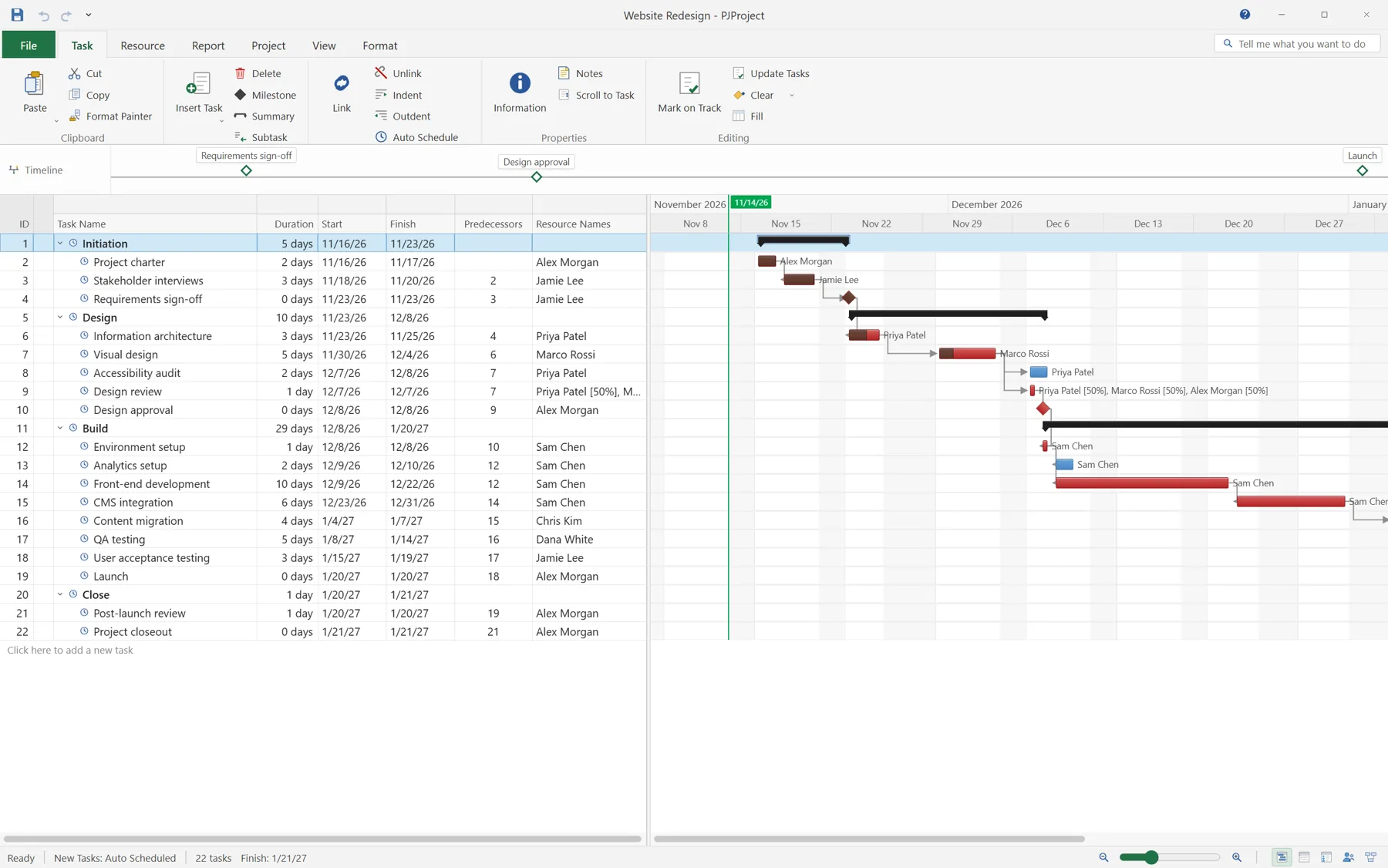
PJProject showing a Gantt chart for a 29-task cloud migration with phases, dependencies, milestones and a critical path.

What it does

Everything a plan needs. Nothing it doesn't.

PJProject is a single desktop application, not a web service with a subscription. Plans stay on your machine, in files you can open, copy and archive.

A Gantt that behaves like a scheduler

Forward and backward pass, FS/SS/FF/SF links with working-time lag, eight constraint types, deadlines, slack and critical-path detection.

  • Task types and effort-driven scheduling
  • Split tasks, leveling and baselines 0–10

15+ views, one model

Task sheet, Tracking Gantt, Task and Resource Usage, Timesheet, Network Diagram, Calendar, WBS/RBS, Resource Graph and reports — all reading the same schedule.

  • Dockable Task Details pane
  • Filters, multi-level sort and grouping

Resources, rates and time

Work, material and cost resources with calendars, availability periods, cost-rate tables A–E, assignments and contours — plus day-by-day actual work.

  • Overallocation detection and leveling
  • Cost roll-ups through summaries

Earned value without a spreadsheet

BAC, PV, EV, AC, SV, CV, EAC, VAC, CPI and SPI calculated as of a project status date — per task, per phase and for the whole programme.

  • Update Project as of a status date
  • Baseline comparison in Tracking Gantt

Files your clients already use

Read and write MPP14 (Project 2010 through Microsoft 365), read MPP12 and MPP9, round-trip MSPDI XML, and import Primavera P6 XER and P6 XML.

  • Unknown MPP streams preserved
  • MPP12/MPP9 read, MPP14 export

Custom fields and real formulas

Design the sheet with columns, widths and text, number, cost, date or duration fields. Formula fields run in a safe expression evaluator with validation.

  • Cost, work and date expressions
  • Values round-trip through MPP/XML

75-second demo

A 14-week IT migration, planned end to end.

The Aurora Cloud Migration is a 29-task, five-phase plan with 10 resources and a $137k budget. The tour runs from the Gantt chart to earned value at 2× speed.

  • 29 tasks, 5 phases, 10 resources
  • CPM critical path, baselines and slip
  • SPI 0.92 earned value as of the status date
  • MPP export plus MS Project XML
Download the demo project .pjproject · 90 KB

Recorded at 2× speed · 1280×720 · narrated

Engineering

Built like software, not a macro.

The scheduler, file parsers and UI are one typed codebase. No Excel engine, no COM automation, no hidden service — just TypeScript running in an Electron shell.

  • TypeScript, end to end 24,000 lines across 28 model modules and 38 React components.
  • A real CPM engine Topological graph, forward/backward pass, calendars, constraints and leveling.
  • Binary file I/O MPP14 reader and writer, MSPDI, P6 XER and P6 XML — implemented in TypeScript.
  • 74 tests, 12 files Scheduling, split tasks, usage edits, formulas and MPP/MSPDI round-trips.
  • Desktop packaging Electron 40, Vite 7, electron-builder and GitHub Actions releases.
run from source
# Node.js 20+
npm install
npm run dev    # Vite renderer + Electron shell
npm test       # Vitest: scheduler, MPP, formulas
src/model/scheduler.ts excerpt
export function scheduleProject(
  project: Project,
  pass = 0,
): ScheduleResult {
  // forward pass: early dates
  for (const id of graph.order) {
    const task = taskMap.get(id);
    // dependency-driven start, calendar aware
    ...
  }

  // backward pass: late dates and slack
  for (const id of [...graph.order].reverse()) {
    ...
  }

  return { hasCycle: graph.hasCycle, project };
}
calendar-aware working time typed end to end
Electron shellwindow, IPC, file dialogs
React 19Gantt, grids, dialogs
ModelCPM, MPP, MSPDI, P6
Local files.pjproject, .mpp, .xml

Tech stack

TypeScript all the way down.

No server, no database, no cloud dependency. A typed Electron application with its own scheduler, costing engine and file parsers.

01Desktop runtime

Shell
Electron 40
Renderer
React 19 + React DOM
Language
TypeScript 5.9 · ES2022 · JSX
Styling
Plain CSS, MS Project-style theme
Icons
Hand-built React/SVG set
State
ProjectStore with undo/redo
Routing
None — custom view switching

02Electron integration

Main
CommonJS main / preload
Bridge
contextBridge + IPC
Security
contextIsolation on, nodeIntegration off
Native
Dialogs, print/PDF, window controls, file association
Persistence
localStorage + native .pjproject files

03Application engines

Schedule
Custom CPM + working-time calendars
Cost
Costing and earned-value calculations
Resource
Time-phased work and leveling
Views
Filter, sort, group and Gantt layout
Output
HTML print renderer + printToPDF

04File formats

Native
.pjproject JSON serializer
MSPDI
DOMParser-based XML reader/writer
MPP14
Read + write, vendored mppwriter
MPP12/9
Custom legacy reader
P6 XER
Tab-table parser + calendar decoder
P6 XML
Custom Oracle P6 XML parser

05Build and test

Bundler
Vite 7 + @vitejs/plugin-react
Types
tsc --noEmit / tsc -b
Tests
Vitest 3 + jsdom 31
Package
electron-builder 26
Targets
NSIS + portable; DMG/ZIP; AppImage/DEB
CI
GitHub Actions, Windows, Node 24

06Validation only not shipped

MPP oracle
MPXJ 16.10 on JRE 21, via Python jpype
Artifacts
REA MCP on ProjectLibre 1.9.8
Reference
ProjectLibre 1.9.8 behavior study

These tools are used during development and never ship inside the app.

Electron 40
├── React 19 + TypeScript 5.9 renderer
│   ├── ProjectStore — undo/redo, selection, files
│   ├── Scheduler · calendars · costing · earned value
│   ├── Ribbon · sheet · Gantt · views
│   └── Parsers — .pjproject, MSPDI, MPP, P6
└── main / preload
    ├── native dialogs and file associations
    ├── printToPDF
    └── electron-builder packaging

Runtime dependencies

2

react and react-dom. No UI framework, no router, no external state library.

Everything else — scheduler, store, views, parsers, icons — is app code.

Industries

One engine, any industry.

If a plan has tasks, dependencies, people and a budget, PJProject can hold it. The critical-path core stays the same; only the vocabulary changes.

01

IT and cloud

Migrations, platform rollouts, security work and cutover weekends.

02

Construction

Phases, trades, inspections and dependencies across site teams.

03

Manufacturing

New product introduction, line changes, tooling and ramp-up.

04

Consulting

Engagements, deliverables, utilization and client billing.

05

Marketing

Campaigns, creative reviews, media windows and launches.

06

Events

Conferences, build-ups, run-of-show and supplier deadlines.

07

Product

Roadmaps, release trains, QA gates and go-to-market.

08

Professional services

Client work, resourcing, cost control and earned value.

Interoperability

Your files, not a lock-in.

Open what your clients and PMOs already use. Export back without a conversion service in the middle.

  • MPP14read + writeProject 2010–365
  • MPP12 / 9readProject 2003–2007
  • MSPDI XMLread + writeMicrosoft Project XML
  • P6 XERimportPrimavera P6
  • P6 XMLimportPrimavera P6
  • PDFexportPrint preview
  • .pjprojectnativeJSON project file

No Microsoft code or assets are included. MPP support is an independent implementation based on study of the published format and shipped artifacts.

Honest notes

What it doesn't do yet.

P6 import is one-way

XER and P6 XML import into the model. Activity codes, UDFs, expenses and EPS structure are not imported, and there is no P6 export.

Some MPP edges are preservation-only

Split-task gaps, custom-field formulas and enterprise fields survive round-trips but are not fully editable inside an MPP file.

One project per window

Multiple project windows, subprojects and view/table copying through the Organizer are still on the roadmap.